Skip to content
Valmurexa Register

Paid live webinar · in English · on Google Meet · payment in crypto

AI coding agent webinar, at a real keyboard

One hour, once a month, from Lisbon. We open a working repository, give Claude Code a real task and go through every step it takes: what it reads, what it changes, what it runs and where you should stop it.

Hosted by Moser Laso, Lisbon · Page reviewed 23 September 2026

  • 60 mindemo plus Q&A
  • 2nd Satof every month
  • 19:00Lisbon time
  • Cryptopayment only
$ claude
> The CSV export drops customers with accented
  names, like "João Simões". Find why and fix it.

 Read src/export/csv.ts
 Read tests/export.test.ts
 Edit src/export/csv.ts (+4 −2)
  encoding was set to latin1 on line 38
 Bash npm test -- export
  14 passed

> Now write the PR description in two lines.
A shortened example of the kind of session we run live. Illustration, not a recording.

It is not a chat window that happens to know code

Most people meet Claude Code with the wrong picture in their head. They expect a smarter autocomplete, type a vague request, get a vague result and decide the tool is overrated.

Claude Code runs in your terminal, inside your project folder. It can open any file there, run your test suite, read the error and try again, and it keeps going until the task is done or it needs your permission. That changes what you have to be good at. Clever prompt phrasing matters far less than two duller skills: giving the agent the context a new colleague would need, and reviewing what it did before you accept it.

The useful question is not "what should I type?" but "what would a new hire need to know before touching this repo?"

That is why the webinar spends almost no time on prompt templates. We spend it on a CLAUDE.md file, on permission settings, on reading diffs and on knowing when to press Escape. Those habits carry over from one release to the next. A list of magic phrases goes stale by next month.

There is a fair objection here: for a five-line script, all this setup is overkill, and a plain chat is quicker. We agree, and we will say where the line sits in our own work.
Who gets the most out of the hour

The demos use TypeScript and Python, but you do not need to write either to follow along. You do need to be comfortable opening a terminal.

Developers and tech leads

You already write code every day and want to hand over the repetitive parts: migrations, test scaffolding, renaming across forty files, chasing a flaky test. We show how to set house rules once in CLAUDE.md so the agent follows your conventions instead of inventing its own, and how to keep review in your hands.

Tech leads usually ask a second question: how to let a team use it without everyone configuring it differently. We cover the shared project settings that live in the repository.

Founders and product people

Internal tools, data clean-up scripts, a prototype you can show on Monday.

Remote workers in Portugal

Freelancers and employees of foreign companies who want a shorter path from ticket to pull request.

Analysts and ops people

If your week is full of shell scripts, spreadsheets exported as CSV and cron jobs, the agent can read and repair those too. One demo in the programme is a small Python data job, not a web app.

Probably not for you if

you want a course on training models, or you have never used a command line and do not plan to. The session will feel too fast.

The hour, minute by minute

Timings hold within a few minutes. If questions pile up during a demo, we answer them there and shorten the final Q&A instead of running over.

Programme of every monthly session
TimeBlockWhat you see on screen
0:00–0:08SetupInstalling Claude Code, signing in, the first run inside a repository
0:08–0:22The working loopOne real bug fixed end to end: ask, plan, edit, test, read the diff
0:22–0:36Project memoryWriting a CLAUDE.md, custom slash commands, shared settings
0:36–0:48Extending itHooks, one MCP server, a subagent that runs tests in parallel
0:48–1:00Q&AYour questions, including the ones sent in with registration

0:08 – 0:22

The working loop on a real bug

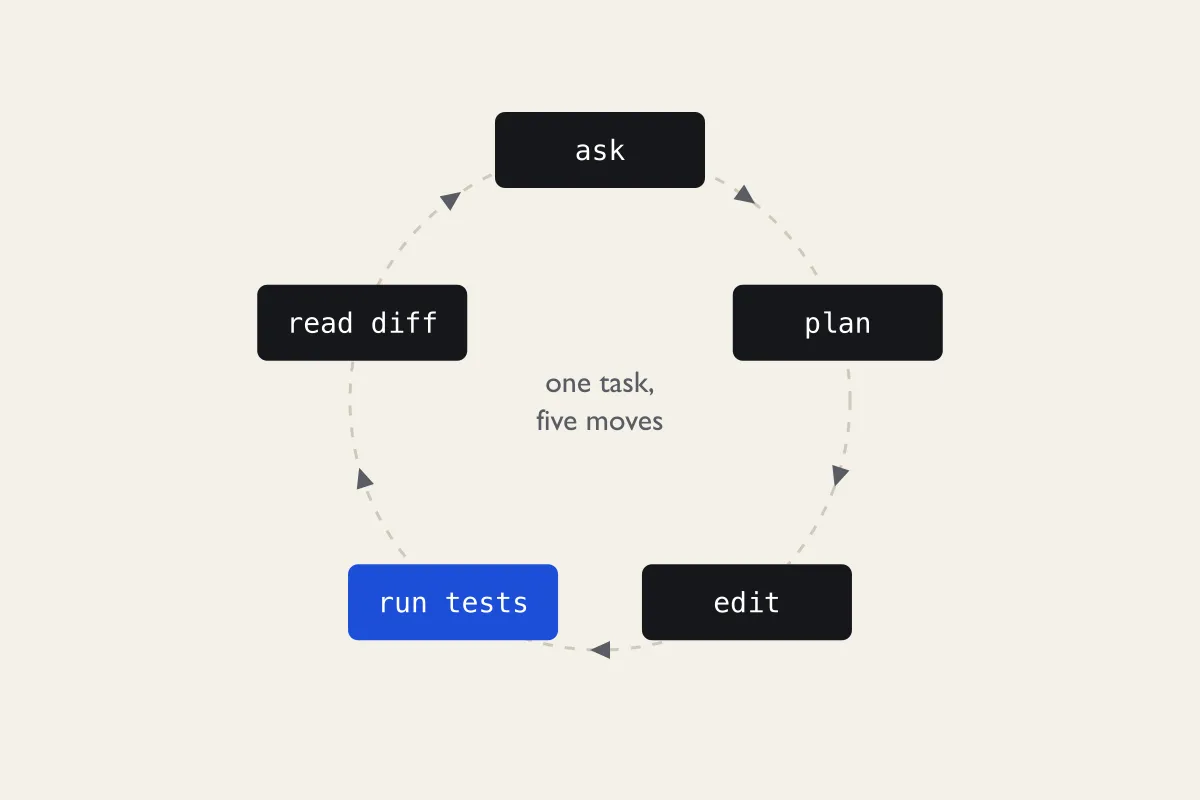
We start from a failing test in a small invoicing service, the same one shown in the terminal above. You watch Claude Code read the relevant files, propose a plan, edit the code and run the tests on its own. Then we do the part people skip: reading the diff line by line before accepting it.

You will see plan mode, which lets the agent explore and propose without touching a single file. It is the safest way to use the tool on a codebase you do not know yet.

Circular diagram with five dark boxes labelled ask, plan, edit, run tests and read diff, joined by a dashed ring with arrows; the run tests box is blue.
Five moves per task. Most mistakes come from skipping the last one.

0:22 – 0:36

Project memory that the whole team shares

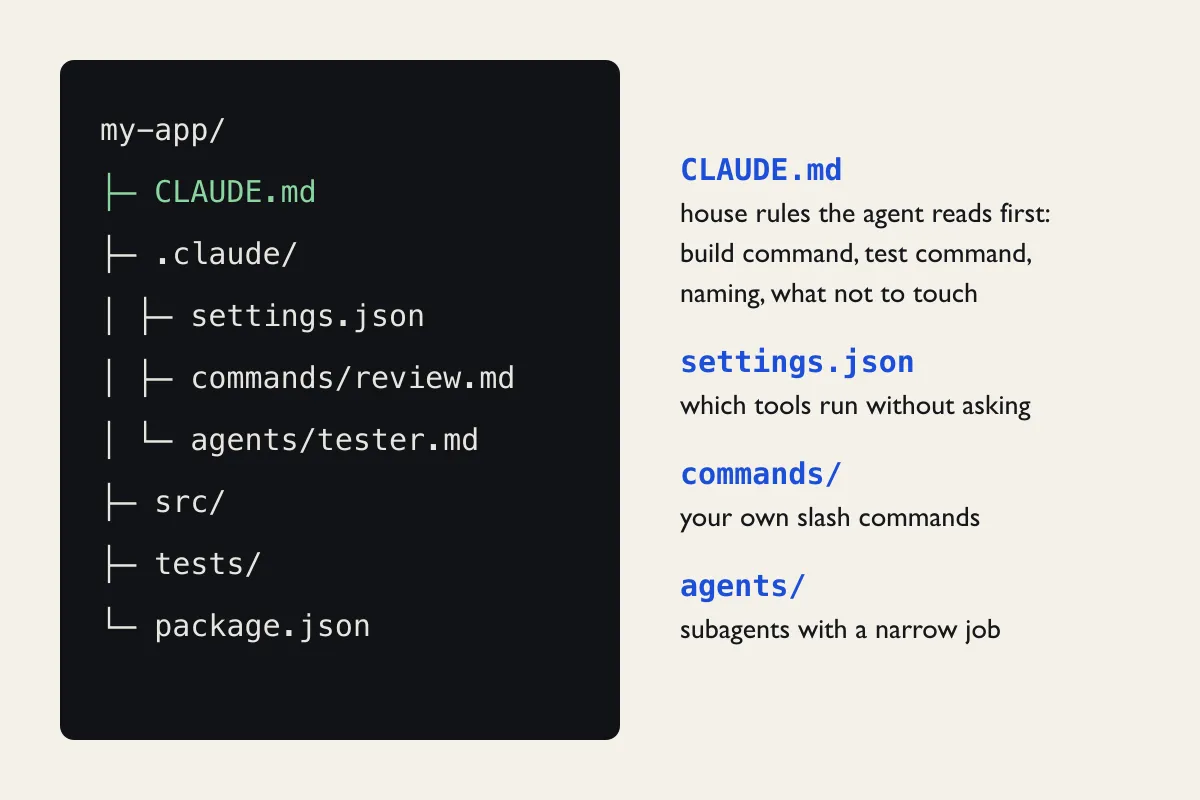
CLAUDE.md is a plain Markdown file at the root of the repository. Claude Code reads it at the start of every session, so it is where you put the build command, the test command, naming rules and the folders nobody should touch. We write one live, from an empty file, and compare the agent's behaviour before and after.

  • what belongs in CLAUDE.md and what just wastes context;
  • custom slash commands stored in .claude/commands/;
  • shared settings.json committed to the repo, personal overrides kept out of it;
  • when to start a fresh session instead of continuing a long one.
Dark file tree of a project called my-app with CLAUDE.md highlighted in green, next to notes explaining CLAUDE.md, settings.json, the commands folder and the agents folder.
The files we create during the session, and what each one controls.

0:36 – 0:48

Hooks, MCP and subagents without the hype

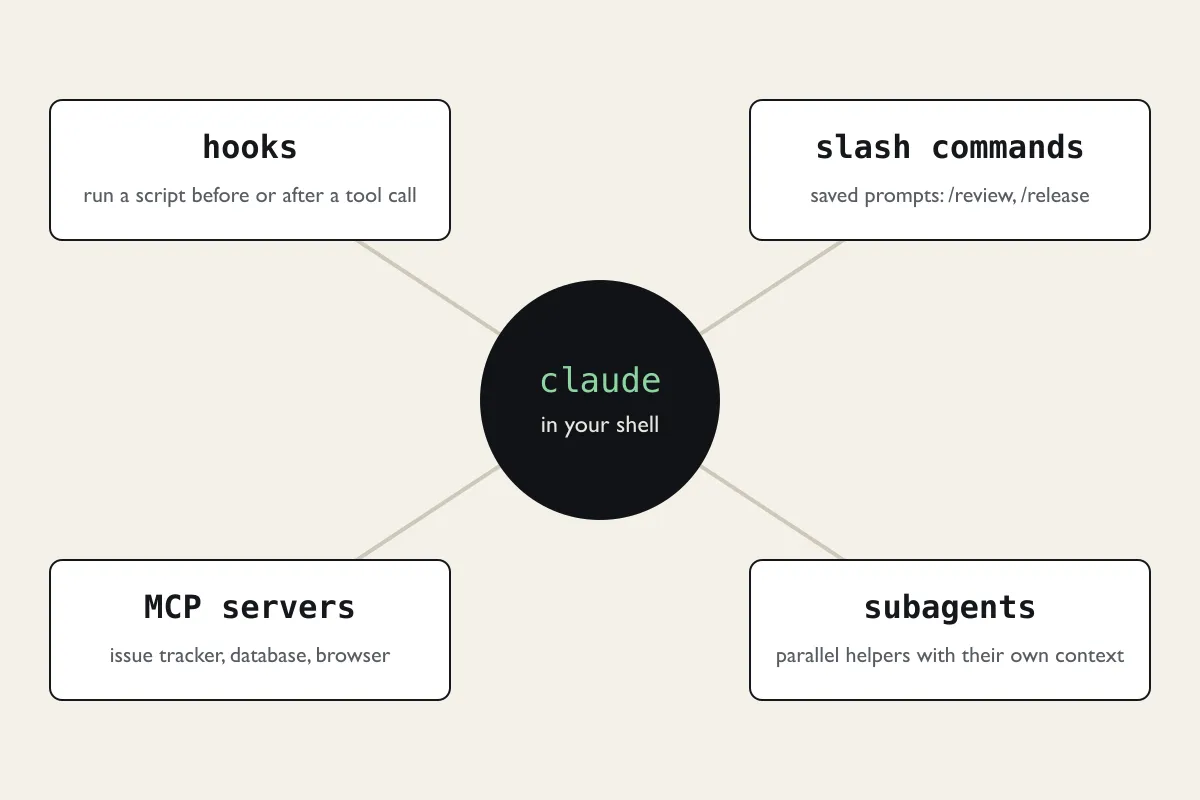
This block shows the extension points in one pass, each with a short practical example. A hook runs the formatter automatically after every file edit. One MCP server connects the agent to an issue tracker so it can read the ticket itself. A subagent runs the test suite in its own context while the main session keeps working.

We also show where each of them is more trouble than it is worth. A hook that blocks too much is annoying fast, and every MCP server you add is more text the model has to read.

Hub diagram: a dark circle reading claude in your shell connected by lines to four white boxes for hooks, slash commands, MCP servers and subagents, each with a one-line description.
Four ways to extend Claude Code, all configured inside the project.

Throughout

Permissions and what the agent may run

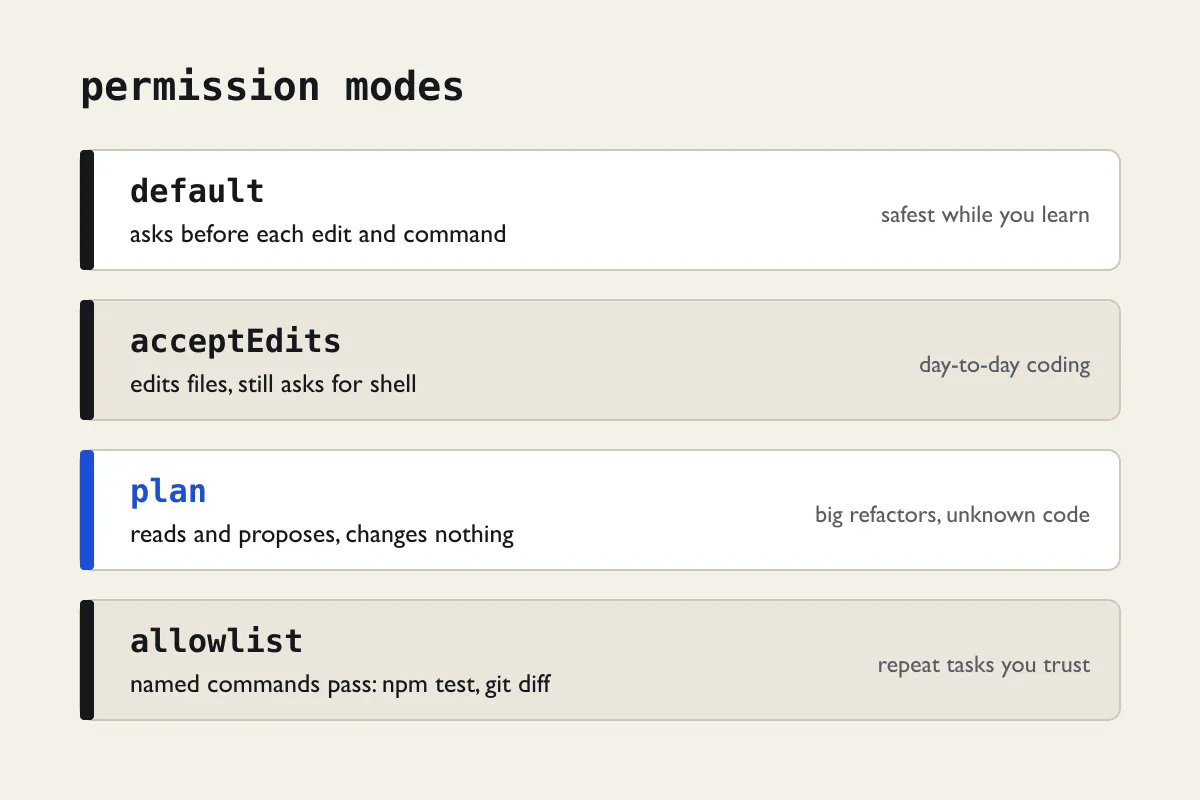
By default Claude Code asks before editing a file or running a command. That gets tedious, and the temptation is to allow everything. We show a middle path: an allowlist of specific commands such as npm test or git diff, edits accepted automatically inside the project, and everything else still behind a prompt.

Cost comes up here as well. The webinar fee does not include Claude Code itself, which needs a paid Claude plan or API credits from Anthropic. We explain how usage is counted without quoting prices, because they change and we would rather send you to the official page.

Four stacked rows titled permission modes: default, acceptEdits, plan and allowlist, each with what the mode does on the left and when to use it on the right; plan is marked in blue.
Four permission set-ups and when each one makes sense.
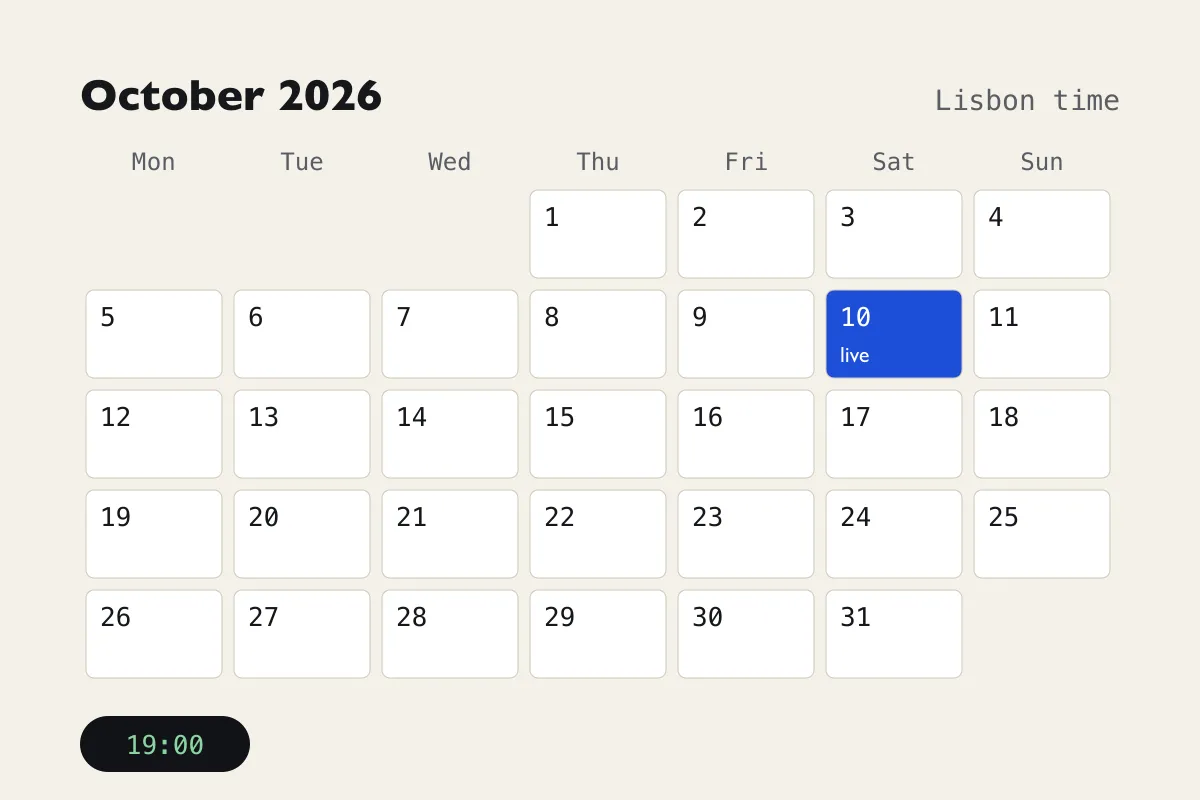
Calendar grid for October 2026 with Saturday the 10th filled in blue and marked live, and a dark chip below showing 19:00.

Second Saturday of every month

One session per date, always at 19:00 Lisbon time, so it fits after work on a weekday schedule and before dinner on a Saturday.

Upcoming dates
DateStartTime zone
Sat, 10 October 2026 next19:00WEST, UTC+1
Sat, 14 November 202619:00WET, UTC+0
Sat, 12 December 202619:00WET, UTC+0
Sat, 9 January 202719:00WET, UTC+0

Portugal moves its clocks back on Sunday 25 October 2026. The October session still runs on summer time; from November onwards, 19:00 in Lisbon is 19:00 UTC. If you join from Madeira, the time is the same as Lisbon; from the Azores, it is one hour earlier.

Your host: Moser Laso

Senior AI Solutions Architect & LLM Engineer · Lisbon

Moser is a Lisbon-based senior software engineer specialising in generative AI workflows, LLM orchestration and developer tooling. Over the past eight years he has built cloud-native software and led the implementation of AI models for European tech start-ups.

His day-to-day focus is practical: the Claude API, prompt optimisation and automated agentic workflows for businesses. Every demo in the webinar is something he has set up for real work first and then reduced to a size that fits into fifteen minutes.

Experience
8+ years in software engineering and applied AI
Based in
Lisbon, Portugal
Runs
every session live, in English, with no pre-recorded parts

More about the webinar and why it exists

Reserve a seat

The webinar is paid, and payment is accepted in cryptocurrency only. Registration takes under a minute: we ask for a name and an email address, because that is where the wallet address for payment and the Google Meet link go.

Participants are responsible for their own taxes in accordance with the laws of their country.

Questions before registering: [email protected]

  1. Pick a date and send the form. Every session starts at 19:00 Lisbon time.
  2. We email you the crypto wallet address for payment and the webinar link.
  3. Your seat is confirmed once the payment arrives in the wallet.
  4. A short reminder comes to your inbox the day before the session.
  5. Changed your mind? Reply to any of our emails and we remove your registration.

Register for the webinar

Second Saturday of the month · 19:00 Lisbon time · Google Meet · paid in crypto

Time 19:00 Lisbon time

Payment is in cryptocurrency only: the wallet address and the webinar link are sent to your email after registration. Participants are responsible for their own taxes in accordance with the laws of their country.

Questions people ask before registering

Do I need Claude Code installed to attend?

No. You can simply watch. If you want to follow along on your own machine, install it beforehand and sign in with a paid Claude plan or an Anthropic Console account; installation takes a few minutes on macOS, Linux or Windows, and the confirmation email links to the official instructions.

Is the session recorded?

No. It is a live session only, so participants can ask about their own projects without worrying that the question ends up online. The programme repeats every month if you miss a date.

Do I need a Google account for Google Meet?

Not necessarily. Meet runs in the browser, and guests without a Google account can ask to join; the host admits them. Camera and microphone are optional, and questions can go in the chat.

What operating system do the demos use?

The live demos run on macOS. Claude Code works the same way on Linux and Windows, but we do not switch systems during the hour, so Windows-specific set-up questions are best sent by email beforehand.

How do I pay for the webinar?

The webinar is paid, and we accept cryptocurrency only. After you register, we email you the wallet address for payment together with the webinar link. We never ask for card or bank details.

Who is responsible for taxes?

Participants are responsible for their own taxes in accordance with the laws of their country. We do not give tax advice.

Is anything else sold during the webinar?

No. Nothing beyond the webinar itself is sold during registration or the session. If you need Claude Code afterwards, you subscribe with Anthropic directly; we have no referral arrangement with them.

The webinar is educational. What you get out of it depends on your projects, experience and effort, and we make no promise about professional or financial results. Claude Code changes often; we update the demos each month, but a feature shown live may behave differently in the version you install. Full text in the disclaimer.